Start durable coding agents from GitHub and Linear with webhooks
Restate Team
Restate Cloud now supports built-in webhooks. Popular webhook sources like Stripe, Linear, and GitHub can deliver their events reliably, straight into your Restate handler. Each event is either processed immediately or queued for asynchronous execution. With that, you no longer need a public server, a queue, or a deduplication store of your own.
What it takes to start an agent from a webhook
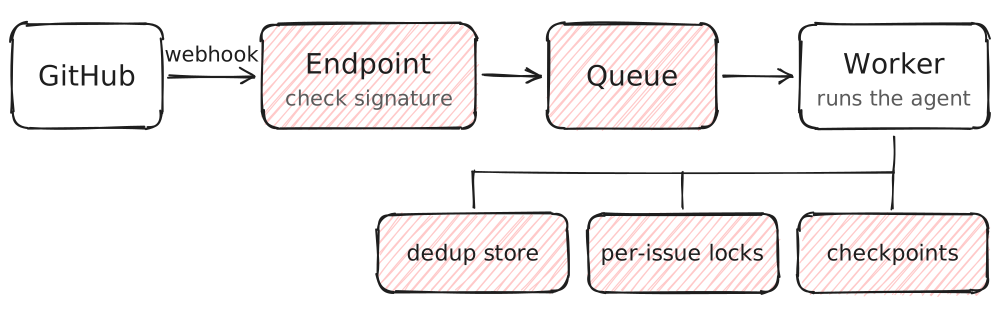
Without Restate, building an agent that starts from a webhook requires a fair amount of plumbing. GitHub and Linear expect a response to webhook events within seconds, while an agent run can take minutes, so you can't run the agent inside the request itself. Instead, you need a public endpoint that verifies the request signature, enqueues the event, and immediately acknowledges it. Once the endpoint has acknowledged the event, the sender considers it delivered. If the event gets lost due to a crash or deployment, it won't be sent again.
Workers then need to consume events from the queue and run the agent, while also handling request deduplication, recovery of failed runs, and correctly routing follow-up events to the right agent.
Ideally, this would be a lot simpler and GitHub or Linear would be able to call a URL that answers only once the event is safely recorded, with baked-in request deduplication, event ordering, and guaranteed completion.
Starting durable work from webhook events
Restate already covers most of that list: it records each call before it answers, doesn't start a second run for a repeated idempotency key, runs one call per issue at a time, and keeps an agent's progress across crashes. What was missing was properly integrated webhook authentication. Normally, callers authenticate to Restate Cloud with an API key. Instead, webhook senders sign the request body with a shared secret1, so you still needed a small public server in front of Restate Cloud to check the signature and pass the event on.
The newly added webhooks support removes that server. You can now create a webhook URL in the Restate Cloud UI and paste it into GitHub's or Linear's webhook settings. Every event then invokes your specified Restate handler. Restate passes the request body and headers to the handler exactly as the sender sent them. The handler runs in your own deployment, on a server, in a container, or as a serverless function, so your agent's code doesn't need a public endpoint either.
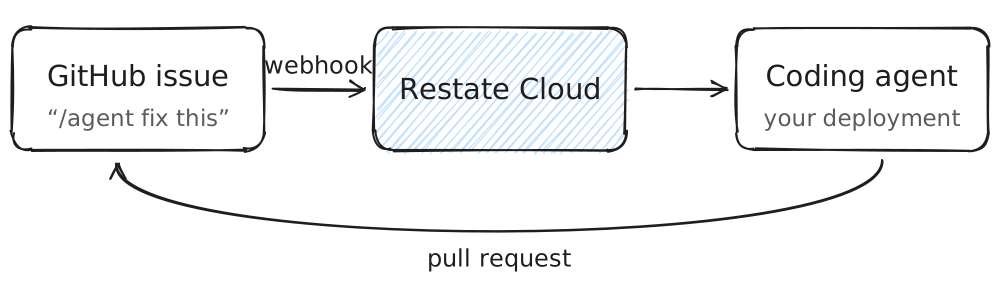
Anyone who has the URL can call the handler, so the handler checks the sender's signature before it does anything else. You also choose what the sender gets back. In async mode, Restate answers as soon as it has recorded the event. In sync mode, the sender gets the handler's own response, which is needed for Linear and Slack.
Receiving a GitHub event
This is the receiving handler from the demo in the video:
export const gitHubWebhook = restate.service({
name: "GitHubWebhook",
handlers: {
  receive: restate.handlers.handler(
    // The raw body, whatever its content type: the signature covers its exact bytes.
    { input: restate.serde.binary, accept: "*/*" },
    async (ctx: restate.Context, body: Uint8Array) => {
      const headers = ctx.request().headers;
      verifySignature(body, headers.get("x-hub-signature-256"));

      // A task for a new comment that starts with "/agent", undefined for anything else.
      const task = parseAgentComment(headers.get("x-github-event"), body);
      if (!task) return { ignored: true };

      // A redelivery has the same delivery ID, so Restate returns the first call
      // instead of starting another agent.
      const deliveryId = headers.get("x-github-delivery");
      const send = ctx
        .objectSendClient(gitHubIssue, `${task.repo}#${task.issueNumber}`)
        .onAgentComment(task, restate.rpc.sendOpts({ idempotencyKey: `github-${deliveryId}` }));
      return { forwarded: await send.invocationId };
    }
  ),
},
});
verifySignature computes an HMAC-SHA256 over the body with the webhook's secret and compares it with the one GitHub sent. The signature covers the exact bytes of the body, which is why the handler takes raw bytes instead of parsed JSON.
parseAgentComment turns a new comment that starts with /agent into a task for the agent, ignoring every other event. The task goes to the GitHubIssue service, which is keyed by the issue (owner/repo#number), as a one-way call.
We use GitHub's delivery ID as the idempotency key of the request. On a redelivery, Restate returns the first call instead of starting another agent.
Once the call is enqueued in Restate, the handler answers to GitHub, while the agent keeps running in the background.
Running the agent
GitHubIssue acknowledges the comment, hands the task to the coding agent, and posts the agent's summary back on the issue:
export const gitHubIssue = restate.object({
name: "GitHubIssue",
handlers: {
  onAgentComment: async (ctx: restate.ObjectContext, task: AgentTask) => {
    await ctx.run("acknowledge", () =>
      github.comment(task.repo, task.issueNumber, "Working on it. I'll open a pull request when I'm done.")
    );

    // The coding agent is another Restate handler. Its model calls and GitHub
    // actions are durable steps in its own journal.
    const result = await ctx.serviceClient(codingAgent).solve(task);

    const link = result.pullRequestUrl ? `\n\nPull request: ${result.pullRequestUrl}` : "";
    await ctx.run("report back", () => github.comment(task.repo, task.issueNumber, result.summary + link));
  },
},
options: {
  // How long Restate remembers an idempotency key. GitHub lets you redeliver for 3 days.
  idempotencyRetention: { days: 3 },
},
});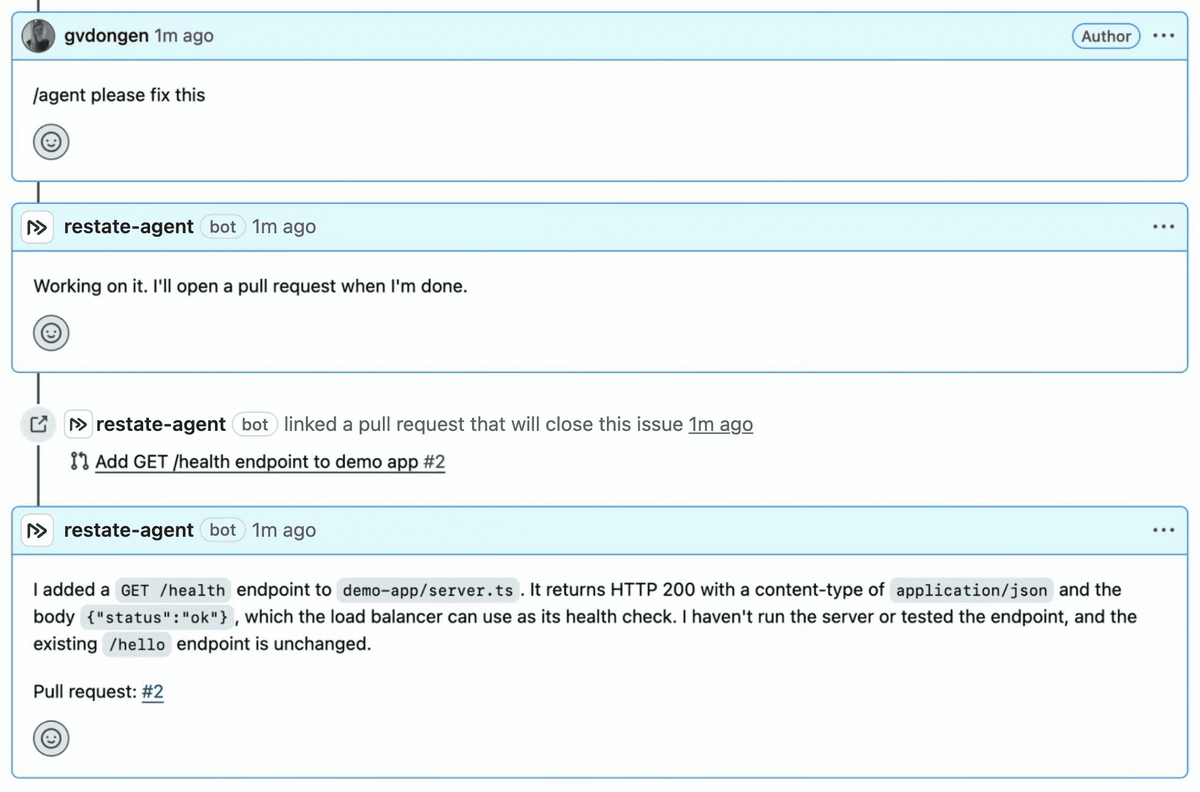
/agent comment starts the agent, and about 20 seconds later it links a pull request and posts a summary.The agent runs asynchronously and can take as long as the agent needs. If the process crashes halfway, the run continues after the last completed step: the agent doesn't start over, and its comments aren't posted twice.
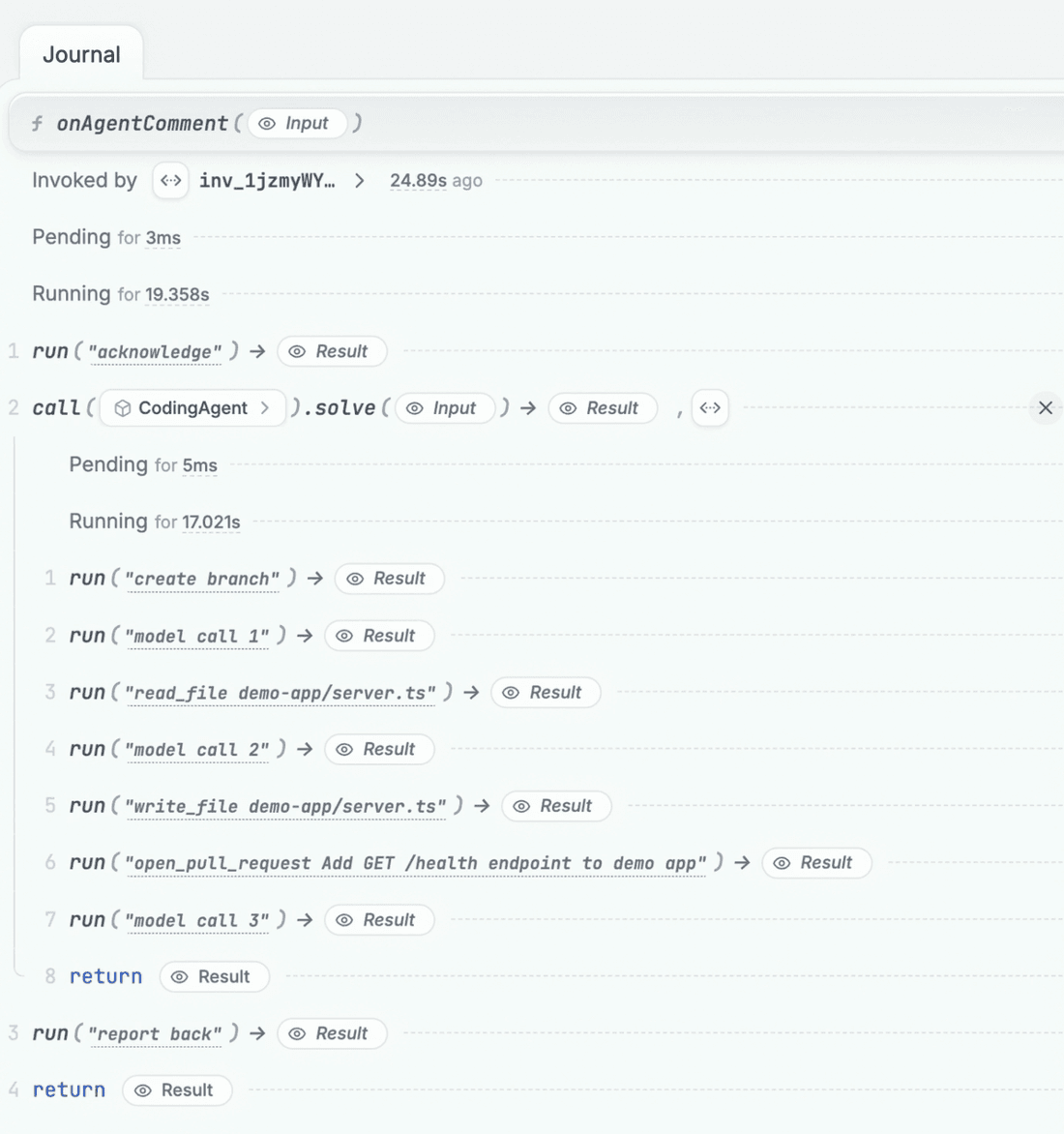
Calls for one issue run one at a time. A follow-up comment waits in the queue until the agent working on that issue is done. This makes sure events do not interfere with each other. If a comment should steer or interrupt the running agent instead, have a look at the agent reference architecture, which shows how to queue a message, add it to the running turn, or interrupt the turn.
Check the webhooks example to see the full code for GitHub, Linear, and Slack.
Let us know what you think!
To try it, create a free Restate Cloud environment, deploy the webhooks example, create a webhook for each sender, and start sending events.
Incoming webhooks are in preview and available in Restate Cloud only for now; the docs list their current limitations. If you're new to Restate, the AI quickstart shows how to write a durable agent.
If you're building a software factory on Restate, we'd love to hear more about your experience. Tell us on Discord or Slack.
Restate is open, free, and available at GitHub. Star the project if you like what we're doing and tell your friends about it!
Footnotes
-
Restate Cloud: invoke services with API keys. Signature schemes: GitHub, Linear, Slack. ↩