Restate vs Temporal
Both are production-grade durable execution systems. Temporal and Restate run highly available, scalable, multi-region deployments, recover work after failures, and support business-critical workflows that can wait for months.
Restate evolves Durable Execution into a building block you can use throughout your backend:
- Broader programming model beyond workflows: Temporal models applications as Workflows and Activities. Restate lets you compose durable functions, workflows, RPC, state, messaging, and queues in the shape that fits the application.
- Up to 10× more cost efficient and in your infrastructure: Temporal Cloud charges per action. Restate BYOC uses reserved-capacity pricing and runs entirely within your cloud account.
- Low latency overhead: Temporal Activities are dispatched via a task queue to polling workers. Restate steps execute inline and persist in a few milliseconds, making fine-grained durability with thousands of steps practical.
- Low operational overhead: Temporal clusters have four components, an external database, and workflow workers. Restate is a self-contained single binary that forms a replicated cluster, while application services run as usual.
Restate gets these properties from a different architecture: a distributed log that combines durability, state, messaging, and scheduling, making durable steps fast and efficient.

"As we continuously evolve our agent architecture, we realized we needed a new durable execution runtime that was both fast and a pleasure for developers to work with. Restate fit that bill perfectly. It now handles all durable orchestration at Replit, giving us the flexibility to rapidly expand what our agent platform can do."
- Up to 25,000 durable actions per second per cell during peak traffic.
- Thousands of inline durable steps per agent execution, persisting in milliseconds.
- Tens of Restate cells across regions and availability zones with Restate BYOC.
At a glance
| Temporal | Restate | |
|---|---|---|
| Infrastructure you operate | Frontend, Matching, History, and Worker Service, an external database, and workflow workers. Each component scales separately in highly available setups. | Lightweight package: a self-contained single binary with embedded storage, deployed multiple times for HA clusters with object store snapshots. |
| Where your code runs | Package code as polling workers; serverless deployments use a controller to start or scale them | Use your existing application hosting: Restate invokes handlers on servers, containers, or compatible serverless platforms; no application polling loop |
| SDKs | TypeScript, Python, Go, Java, .NET, PHP, Ruby, Rust | TypeScript, Python, Go, Java, Kotlin, Ruby, Rust |
| Cost of a durable step | Each durable step requires dispatching an Activity to polling workers, adding scheduling and network overhead, and encouraging coarser durable steps. | Few milliseconds overhead per durable action: use durability granularly, even inside the agent loop for LLM calls, tool calls, and guardrails |
| How you structure code | Split orchestration into Workflows and external I/O into Activities | Write durable functions that execute inline durable steps, or split work across services using durable RPC |
| Stateful entities | Model entities as indefinitely running workflows; write request coordination via Signals/Updates and carry state into new Runs as history grows | Virtual Objects: First-class primitive with built-in concurrency control and per-entity K/V state |
| Deployment options & Pricing | Self-host or Temporal Cloud | Self-host, Restate Cloud or BYOC in your cloud account and up to 10× more cost efficient at scale |
Why teams choose Restate over Temporal
Lightweight deployment with same durability and availability
Both Restate and Temporal run at large scale in production, support multi-region deployments, and make mission-critical code resilient against failures and across long waits (weeks, months, years).
They differ in deployment models and operational overhead:
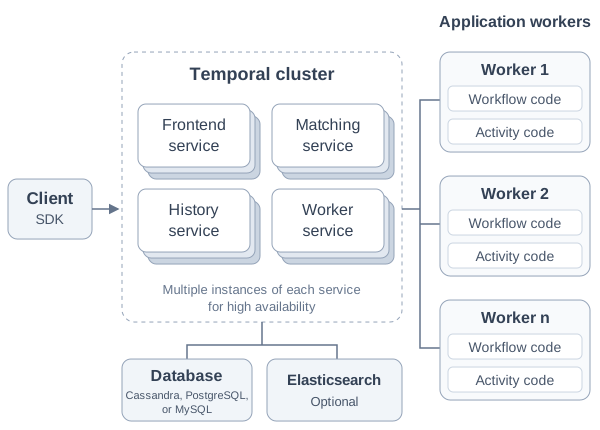
Source: Temporal documentation — Run a Self-hosted Temporal Service.
Temporal’s production deployment has several components to deploy, scale, and upgrade:
- Four core services: Frontend, Matching, History, and Worker Service. Temporal recommends running them as separate processes, with multiple instances of each for high availability and scaling.
- A highly available database: Cassandra, PostgreSQL, or MySQL stores event history and workflow state.
- [Optional] Visibility storage: PostgreSQL and MySQL support advanced search; or you can use Elasticsearch or OpenSearch.
- Application workers: processes that poll for tasks and execute workflow and activity code.
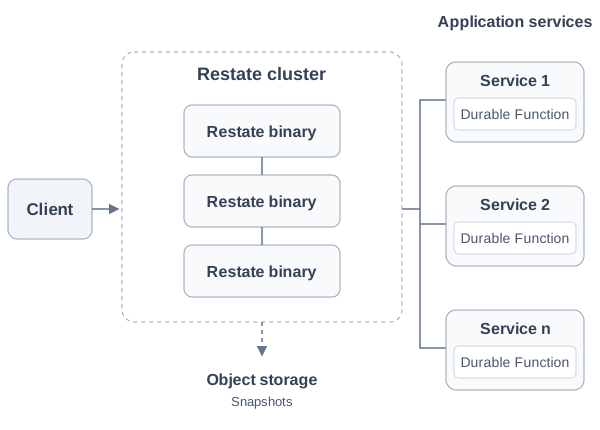
Restate packages its runtime into a single binary, built as a database for Durable Execution with a distributed log and consensus algorithm at its core. Each node runs the same binary, with no external database dependency. Production clusters use multiple nodes with persistent volumes and object-store snapshots to speed up recovery, and can span multiple regions. Your code runs on normal Python/Node/JVM/... processes on Kubernetes, Google Cloud Run, Cloudflare Workers, and AWS Lambda. They get invoked over HTTP, without a dedicated application worker process or task-polling loop.
Restate supports financial transaction processing in production at Bilt Rewards, KPMG, and Fortune-100 banks with multi-regional strong consistency and availability.
Fast durable execution with low overhead per step
Both systems persist execution progress so code can recover after failure, but they coordinate and record steps differently.
Temporal
Restate
Temporal schedules activities through task queues. Workers poll for work, execute it, and report results; the cluster persists those results before the workflow resumes. Each activity adds scheduling, dispatch, and network round trips. Local Activities avoid that round trip, but results become durable only when the enclosing Workflow Task completes. If a Worker fails before that marker is recorded, the Local Activity executes again, so it needs to be idempotent.
Restate executes steps inside your service. A fast bidirectional stream carries SDK journal entries—step results, calls, state changes, and timers—to the server’s replicated log and returns acknowledgments. Each durable step commits before the next step, without a separate activity worker. Invocations and service-to-service RPC are persisted in Restate's internal queues and dispatched and retried for you. Opt-in flow control sets concurrency limits over those queues.
Fast commits and steps that execute inline give Restate three practical benefits:
- Low overhead and low latency: <10 ms per durable action in P99 latency overhead under load, so durability does not add a large delay to short operations.
- Fine-grained recovery: lower step overhead makes it practical to persist smaller units of progress and recover without repeating completed work. For example, commit an agent’s guardrail evaluation before its tool call.
- Share resources across steps: reuse database connections, agent sandbox connections, and other in-process resources while the handler runs.
After migrating to Restate, Replit Agent runs executions with thousands of durable steps, each persisting in milliseconds, making fine-grained recovery practical inside the agent loop.
Beyond workflows: durable functions, Virtual Objects, and RPC
Temporal applications must be shaped as workflows and activities, even when the natural abstraction is a service or long-lived stateful entity (e.g. agent). Workflows are not necessarily an efficient shape to express: microservices apps, durable RPC, webhook/event consumers, agent sessions, request/response APIs, queues. Temporal also supports standalone Activities, if you only require a single step.
Restate is a durable runtime that makes your services themselves durable. You compose durable functions, workflows, RPC, state, messaging, and queuing, into the most efficient and natural shape for your problem. A function can run a long-lived process, execute durable steps inline, sleep for a month, or call another function or object through durable RPC and await its result.
A quickstart-style greeting with one durable step, expressed as a Temporal Activity or a Restate run block:
Temporal
SDK example ↗import { proxyActivities } from "@temporalio/workflow";
import type * as activities from "./activities";
const { greet } = proxyActivities<typeof activities>({
startToCloseTimeout: "1 minute",
});
export async function greeter(name: string): Promise<string> {
return await greet(name);
}export async function greet(name: string): Promise<string> {
return `Hello, ${name}!`;
}import { Worker } from "@temporalio/worker";
import * as activities from "./activities";
async function main() {
const worker = await Worker.create({
workflowsPath: require.resolve("./workflows"),
activities,
taskQueue: "greeter",
});
await worker.run();
}
main().catch(console.error);Restate
SDK example ↗import { service, serve, type Context } from "@restatedev/restate-sdk";
const greeter = service({
name: "Greeter",
handlers: {
greet: async (restate: Context, name: string) => {
return await restate.run("greet", () => `Hello, ${name}!`);
},
},
});
serve({ services: [greeter] });Virtual Objects: first-class stateful entities with built-in concurrency control
Many parts of an application are stateful entities: agents, chat sessions, shopping carts, user profiles, devices. They have an ID and some state, and receive independent requests over time.
Restate has Virtual Objects as a first-class building block for this. A Virtual Object is a stateful entity that is addressable by its ID and has durable execution, persistent K/V state, and per-entity concurrency control.
Temporal does not have a first-class primitive for this. You represent each entity as an indefinitely running Workflow. Each invocation is a Signal, Update, or Query. That leaves more of the entity’s coordination and lifecycle in your application code:
| Temporal long-lived Workflows | Restate Virtual Objects | |
|---|---|---|
| Invocation and replies | Address the Workflow by ID. Use an Update when the request must return a result, or Update-with-Start when the Workflow may not be running yet. Signals are asynchronous and need a separate reply path, such as a Query. Passing the request from a handler to the main Workflow loop requires coordination through workflow variables and wait conditions. | Call a handler by object ID over HTTP or an SDK client, and optionally wait for its result: POST /MyAgent/session-123/run. |
| Concurrent requests and multi-writer protection | Async handlers interleave at awaits. Add locks, queues, or rejection logic to protect shared state. | Built-in. Exclusive handlers are queued per key; shared handlers can read state concurrently. Different keys run independently. |
| Where state lives | Workflow variables, reconstructed by replaying event history. | Restate stores durable K/V state per object key in its embedded store, backed by RocksDB. |
| History / journal management | Each turn adds to the same workflow Run’s event history. For long sessions, your code must trigger Continue-As-New, finish active handlers, and pass state to a fresh Run before reaching history limits. | No coordination required. Each handler invocation has its own execution journal. Object state persists across turns until you clear it. |
| Inspection | UI shows execution history across all turns. Exposing workflow variables needs a Query handler and an available worker. | Dedicated UI overview page per object to inspect K/V state, ongoing and queued invocations, per-turn journals, and hot keys. |
| Calling another entity | Workflow-to-workflow Updates need to go via an Activity. Direct Signals have no return value. | Durable RPC, messaging, and future task scheduling, with configurable concurrency. |
Applications often combine several of these entities. A session owns conversation history, an agent owns its configuration, and a profile owns preferences. With Restate's durable RPC, the session can call the agent, which can call the profile. Each object has its own state and concurrency boundary, and Restate recovers these calls after failures. Exclusive calls to a busy key wait their turn; unrelated keys run independently.
With Temporal, these can be separate workflows, but requesting a result from another entity adds a step: schedule an Activity that sends an Update and returns its result. Direct workflow-to-workflow Signals are asynchronous and need a separate reply mechanism.
Here is a multi-turn chat agent in both systems, following their respective reference architectures:
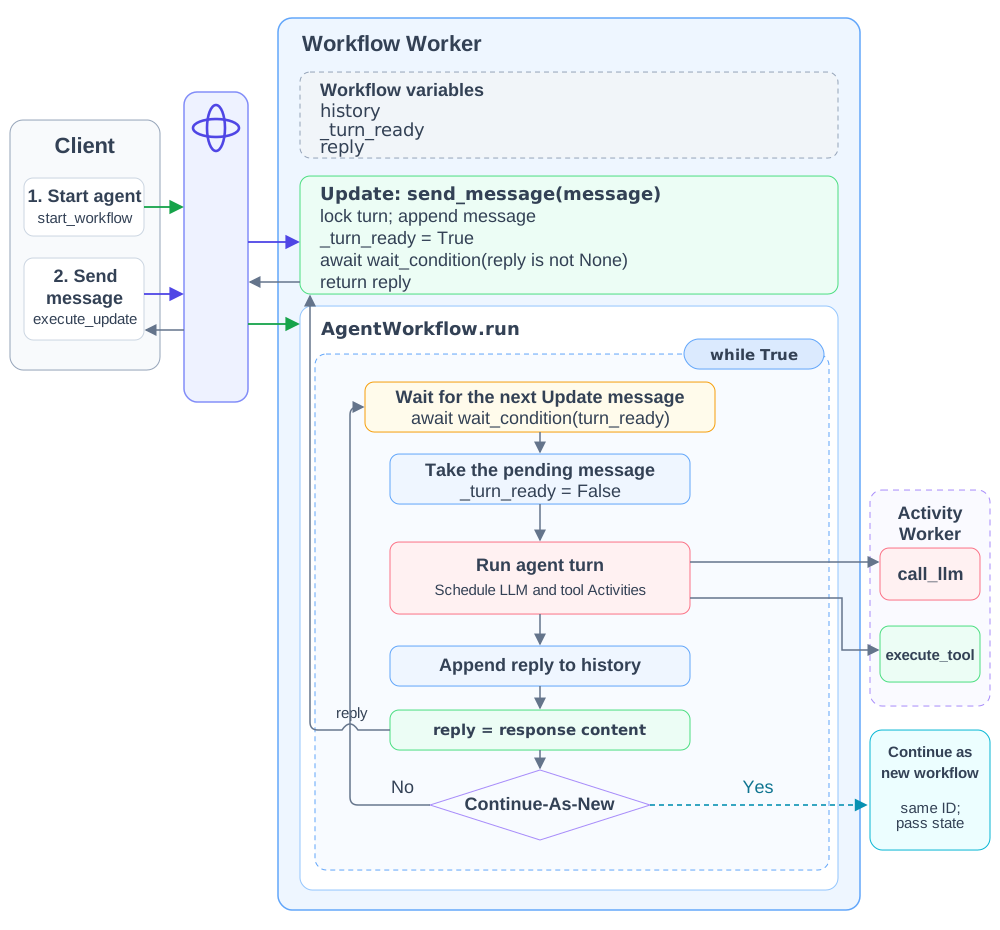
An indefinitely running workflow. A new turn (iteration of the while-loop) gets triggered via a wait condition that gets triggered via Updates or Signals, as proposed by Temporal’s reference architecture. Each Update passes a message to the workflow loop through shared state and waits for its reply via shared state; the loop runs the agent through Activities. Added Continue-As-New for long sessions and an asyncio.Lock to serialize overlapping turns.
View Temporal Python code
import asyncio
from dataclasses import dataclass, field
from datetime import timedelta
from temporalio import workflow
from temporalio.exceptions import ApplicationError

with workflow.unsafe.imports_passed_through():
  from activities import call_llm, execute_tool

@dataclass
class AgentInput:
  system_prompt: str
  history: list[dict] = field(default_factory=list)

@workflow.defn
class AgentWorkflow:
  MAX_STEPS_PER_TURN = 20

  @workflow.init
  def __init__(self, input: AgentInput) -> None:
    self._system_prompt = input.system_prompt
    self._messages = list(input.history)
    self._done = False
    self._turn_ready = False
    self._reply: str | None = None
    self._turn_lock = asyncio.Lock()

  @workflow.update
  async def send_message(self, user_message: str) -> str:
    # Hold the lock until this turn has returned its reply.
    async with self._turn_lock:
      self._messages.append({"role": "user", "content": user_message})
      self._turn_ready = True
      await workflow.wait_condition(lambda: self._reply is not None)
      reply = self._reply
      self._reply = None
      return reply

  @send_message.validator
  def validate_send_message(self, user_message: str) -> None:
    if not user_message.strip():
      raise ValueError("user_message must not be empty")
    if self._done:
      raise ValueError("session has ended")

  @workflow.signal
  def end_session(self) -> None:
    self._done = True

  @workflow.query
  def get_messages(self) -> list[dict]:
    return self._messages

  @workflow.run
  async def run(self, input: AgentInput) -> str:
    while True:
      # Keep processing accepted Updates, including those waiting on the lock.
      await workflow.wait_condition(lambda: self._turn_ready or (
        workflow.all_handlers_finished() and (
          self._done or workflow.info().is_continue_as_new_suggested()
        )
      ))
      if not self._turn_ready:
        if self._done:
          return "Session ended"
        workflow.continue_as_new(AgentInput(self._system_prompt, self._messages))

      self._turn_ready = False
      for _ in range(self.MAX_STEPS_PER_TURN):
        response = await workflow.execute_activity(
          call_llm, args=[self._system_prompt, self._messages],
          start_to_close_timeout=timedelta(minutes=5),
        )
        self._messages.append(response["message"])
        if response["is_final"]:
          self._reply = response["message"]["content"]
          break
        tool_calls = response["tool_calls"]
        results = await asyncio.gather(*[
          workflow.execute_activity(
            execute_tool, args=[tc["name"], tc["arguments"]],
            start_to_close_timeout=timedelta(minutes=2),
          ) for tc in tool_calls
        ])
        for tc, result in zip(tool_calls, results):
          self._messages.append({"role": "tool", "tool_call_id": tc["id"], "content": result})
      else:
raise ApplicationError("Agent exceeded step limit", non_retryable=True)from temporalio import activity
from agent_runtime import llm, tools
@activity.defn
async def call_llm(system_prompt: str, messages: list[dict]) -> dict:
return await llm.call(system_prompt, messages)
@activity.defn
async def execute_tool(name: str, arguments: dict) -> str:
return await tools.execute(name, arguments)import asyncio
from temporalio.client import Client
from temporalio.worker import Worker
from workflows import AgentWorkflow
from activities import call_llm, execute_tool
async def main():
client = await Client.connect("localhost:7233")
worker = Worker(client, task_queue="chat-agent",
workflows=[AgentWorkflow], activities=[call_llm, execute_tool])
await worker.run()
if __name__ == "__main__":
asyncio.run(main())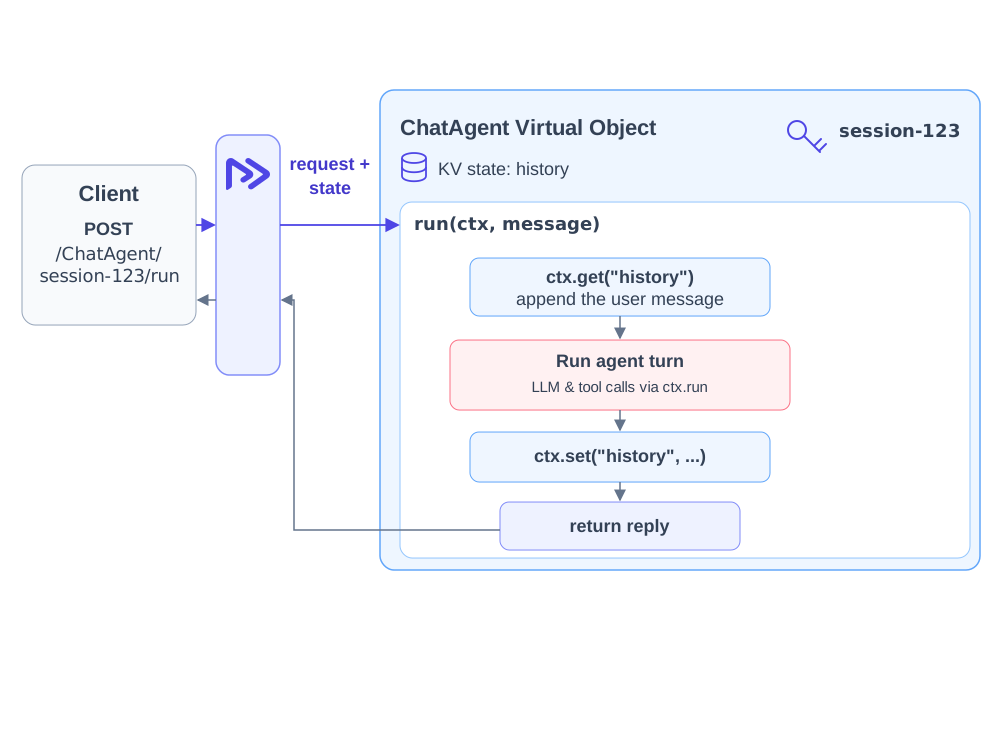
Each turn calls run via POST /ChatAgent/my-session-key/run. Restate queues turns for the same session, to protect against concurrent state changes from different executions. K/V state outlives handler executions and is stored in Restate's embedded state store. Other sessions run independently.
View Restate Python code
from restate import VirtualObject, ObjectContext, TerminalError, app as create_app, gather
from agent_runtime import llm, tools

chat_agent = VirtualObject("ChatAgent")


# Calls to this handler are serialized per session ID.
@chat_agent.handler()
async def run(restate: ObjectContext, message: str) -> str:
  # State remains available between turns.
  history = await restate.get("history") or []
  history.append({"role": "user", "content": message})

  for _ in range(20):
    # Run the LLM inline in this handler; persist its result in the journal.
    response = await restate.run_typed(
      "call_llm", llm.call,
      system_prompt="You are a helpful assistant.",
      messages=history,
    )
    history.append(response["message"])

    if response["is_final"]:
      restate.set("history", history)
      return response["message"]["content"]

    # Run tools here too, concurrently; each result is persisted in the journal.
    tool_calls = response["tool_calls"]
    results = await gather(*[
      restate.run_typed(
        "execute_tool", tools.execute,
        name=tc["name"], arguments=tc["arguments"],
      )
      for tc in tool_calls
    ])

    for tc, result in zip(tool_calls, results):
      result = await result
      history.append({
        "role": "tool", "tool_call_id": tc["id"], "content": result,
      })

  raise TerminalError("Agent exceeded step limit")


app = create_app([chat_agent])
Virtual Objects are a key reason teams choose Restate. DOSS builds its workflow DSL interpreter as a Virtual Object; Replit modeled its Agent platform on several Virtual Objects connected via Durable RPC. A first-class entity primitive keeps this coordination out of application code.
Native serverless support via push model
Restate pushes invocations to services. Services run like normal Python/Node/JVM/... processes, not on workers. They can run on Kubernetes, containers, VMs, or serverless platforms. Temporal application code runs in Worker processes that poll Task Queues for Workflows and Activities.
Temporal's polling model assumes a long-running Worker, which does not map directly to serverless. Serverless Workers add a Worker Controller Instance that monitors Task Queues and starts or scales provider-specific workers. Cold capacity must start before those workers can connect and poll for tasks, adding another control-plane step. The feature also requires Worker Versioning, with a compute provider configured per deployment version. As of September 2026, AWS Lambda is in public preview; Cloud Run and Bedrock AgentCore are pre-release.
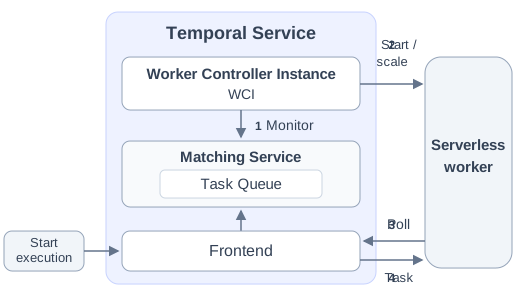
Source: Temporal documentation — Worker Controller Instance.
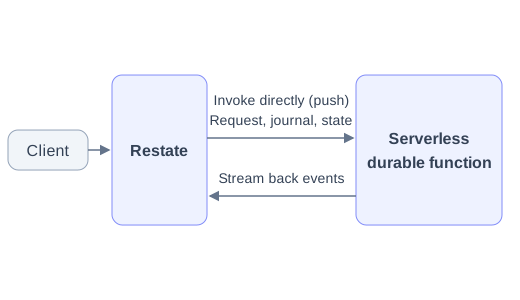
Restate's push model lets you invoke serverless handlers directly. Restate supports Lambda, Cloud Run, Cloudflare Workers, Vercel, Deno Deploy, Modal, Render, Railway, Fly.io, sandboxes, and similar platforms. If a platform supports HTTP/2 bidirectional streaming and the endpoint enables it, events stream back to Restate during execution. Otherwise, Restate uses a request-response protocol that ends the request at suspension points and re-invokes the handler when it can continue.
Both support long-running workflows with suspensions. A Restate handler can suspend for weeks or months while waiting for a timer or approval. Progress stays in Restate, so neither the handler process nor its connection needs to stay alive during the wait.
Container services can also connect to Restate Cloud from a private network. With an outbound tunnel, Restate routes invocations to your services without a public endpoint or inbound firewall ports.
BYOC: up to 10x more cost efficient and in your infrastructure
Temporal Cloud is managed, but does not offer BYOC. To run Temporal in your own infrastructure, you need to self-host it and operate the cluster and database described above, including scaling, upgrades, and recovery.
You can self-host Restate or use Restate Cloud or BYOC. With BYOC, Restate operates a dedicated, single-tenant deployment, with the cluster and application data inside your own cloud account and VPC. You pay for reserved processing capacity rather than per action, which can make it up to 10× more cost efficient at sustained high volumes.
These estimates from the BYOC comparison post compare Temporal Cloud action charges with Restate BYOC’s license and underlying cloud infrastructure:
| Average workload | Actions per month | Temporal action cost only | Restate BYOC license + infrastructure | Cost advantage |
|---|---|---|---|---|
| 500 actions/sec | ~1.2B | >$32k/mo | ~$6–7k/mo | >4× |
| 5,000 actions/sec | ~13B | ~$300k/mo | ~$30k/mo | ~10× |
For Temporal, we assume $25 per million and exclude storage, so the real bill might be higher. The Restate BYOC column is all-in: license plus the underlying cloud infrastructure.
See Restate pricing and Temporal pricing for current rates.
Replit has tens of Restate BYOC deployments to support enterprise deployments of Replit Agent. Several BYOC customers process more than 100K durable actions per second in production.
What teams building on Restate say
Restate is one of the most impressive technologies that I have used in recent years. It's like Microsoft Orleans and Temporal had a baby.
We just exchanged all of our internal run functions with restate.run and it mostly just worked. And the UI is much nicer than looking at database columns all day.
Restate is much better from an engineering perspective. It's more flexible than alternatives, and the self-hosting option was crucial for us.
Frequently asked questions
Can Restate be used for enterprise workflows?
Yes. Restate runs long-running, business-critical workflows in production, including financial workflows for bank account and credit card operations at Fortune 100 banks. Temporal and Restate are both production-grade durable execution systems; the differences are their programming models, execution overhead, and deployment options.
Will I need to move from Restate to Temporal as my use case grows?
No. A larger workload, a longer-running workflow, or stricter availability requirements do not require a move to Temporal. Restate scales out through partitioned, replicated clusters and is used for high-volume, business-critical workloads.
Restate is more lightweight. Does that mean it is less resilient?
No. Lightweight refers to the deployment model, not weaker durability. In a production cluster, Restate commits events to a quorum-replicated log, maintains follower processors for failover, and stores object-store snapshots for recovery. Multiple instances of the same binary provide high availability and horizontal scale without requiring a separate database or several independently deployed server types.
Can Restate run highly available, scalable, multi-region clusters?
Yes. Restate clusters partition work across nodes, replicate the durable log with flexible quorum writes, and maintain follower processors for fast failover. Deploy multiple instances of the same Restate binary across failure domains or regions, with object-store snapshots for recovery. Restate Cloud and BYOC provide managed deployment options.
Can a Restate workflow sleep for months and recover reliably?
Yes. Durable timers and external-event waits are persisted by Restate. The handler suspends without keeping its process or connection alive, and Restate invokes it again when the timer fires or the event arrives. Completed work is recovered from the journal instead of being executed again.
Is Restate directly inspired by Temporal?
No. Restate's spiritual predecessor is Stateful Functions, a library for building event-driven applications on top of Apache Flink. When we built Apache Flink, one of the core ideas was to make stateful stream transformations a building block from which developers could compose a wide range of streaming applications. We wanted something similar for the asynchronous, event-driven, long-running work that increasingly makes up our backends. To learn more about why we started building Restate, read “Why we built Restate.”
Apache Flink · Stateful Functions documentation · Why we built Restate
Can I migrate my Temporal workflow to Restate?
Yes. There are three main mappings:
- Workflow → Restate handler. A Temporal Workflow becomes a Restate Workflow or service handler. Restate workflows and services
- Activity → restate.run() block. Each Activity becomes an inline durable step inside a handler, or a durable RPC call to another handler. Durable steps · Durable RPC
- Signal → awakeable or invocation of a keyed handler. For external resolvers such as approvals and webhooks, use an awakeable or durable promise. For per-entity messages such as chat sessions, carts, and agents, invoke a Virtual Object handler; Restate serializes exclusive calls per key automatically. External events · Virtual Objects
Workflow state and external stores collapse into Restate's embedded keyed K/V; worker pools collapse into Restate services—HTTP endpoints you deploy anywhere.
Use the Restate Migration Skill for assisted code translation